


Ski Business Advertising using Google Adwords
Start Advertising with Google Adwords
Sign-up for and use Google Adwords to advertise on J2Ski.
Visit the Google Adwords Sign-Up page to create your Adwords account.
When you have created an Adwords account, or if you already use Google Adwords, then you can...
Target J2Ski.Com by using Google Adwords Managed Placements.
Create a Google Adwords Account
Tip :- Google have made Adwords Account creation quite straightforward, but if you are new to Google Ads, you might want to keep this page open in a separate window so you can see our hints for each step.
Simply follow the instructions to create your account and your first advert.
Set Up Your Ad (Campaign)
When you login to Adwords for the firs time, you will be prompted to setup "Your first campaign". Don't worry about getting it perfect at this point - you can change the details later; the ad will not start running until you've provided Google with billing information and started the campaign.
Decide how much to spend
Set a daily budget to control your Ad Spend.
Choose a target audience
- Set the location(s) of the customers you want to attract (e.g. those in the UK or France).
- Leave both Search Network and Display Network selected - J2Ski's pages are in both networks, but you'll get the widest reach by using both.
- Set the keywords you want to use to match suitable pages on which to display your Ad (e.g. "Ski", "French Ski Resorts").
Set your bid
Set a maximum bid, or allow Adwords to adjust it automatically within your Daily Budget.
Write your Ad
Enter the address (URL) of the landing page (the page your visitors will arrive at after clicking your advert) in the first field, then enter the text for your Ad like this...

Books have been written on the effective construction of text ads but the essential objective is to grab the reader's attention and entice them to click-thru to your site :-
- Make sure your most important key-word or phrase is in the title.
- Include complementary words in the following lines.
- Ensure the advert and the landing page are obviously related - otherwise your click-thru visitors will just hit the back button.
Choose keywords
Enter half a dozen key-words - note that Google will make suggestions based on the information it can glean from your site.
Currency, Budget and Contact
Fill in the details as you prefer - we recommend signing up for the newsletter and optimization tips as these will help you achieve the best performance for your adverts.
Click Continue at the foot of the form.
Set Up Your Account
Account Validation
Google will now ask you for an e-mail address to associate with the account, and will send you an e-mail with a link for you to validate the account.
Billing Information
After validating your account, login and follow the instructions to provide your payment details - only once this is completed can you activate and run your advert.
Managing your Account
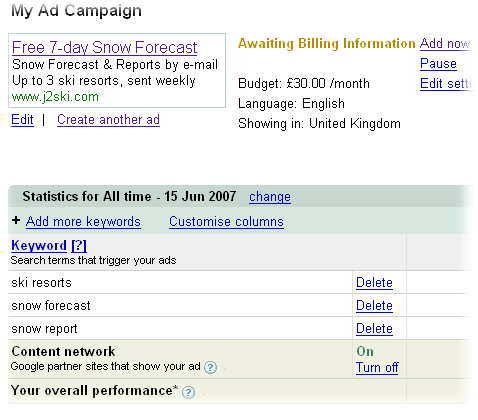
You can pause your advertising at any point, change the content of the ad or adjust your monthly budget according to your needs.
You should regularly monitor the performance of your ad, using the reports displayed whenever you login to Adwords. These will show you the performance against all your chosen key-words, and which web sites are showing your ads.
Learning More
We thoroughly recommend reading as much as you can from the Adwords Help Center, and paying careful attention to the hints and tips that AdWords will automatically provide to help you tune your ads for the best performance.